LiteLLM Content Filter
Built-in guardrail for detecting and filtering sensitive information using regex patterns and keyword matching. No external dependencies required.
Overview
| Property | Details |
|---|---|
| Description | On-device guardrail for detecting and filtering sensitive information using regex patterns and keyword matching. Built into LiteLLM with no external dependencies. |
| Guardrail Name | litellm_content_filter |
| Detection Methods | Prebuilt regex patterns, custom regex, keyword matching |
| Actions | BLOCK (reject request), MASK (redact content) |
| Supported Modes | pre_call, post_call, during_call (streaming) |
| Performance | Fast - runs locally, no external API calls |
Quick Start
LiteLLM UI
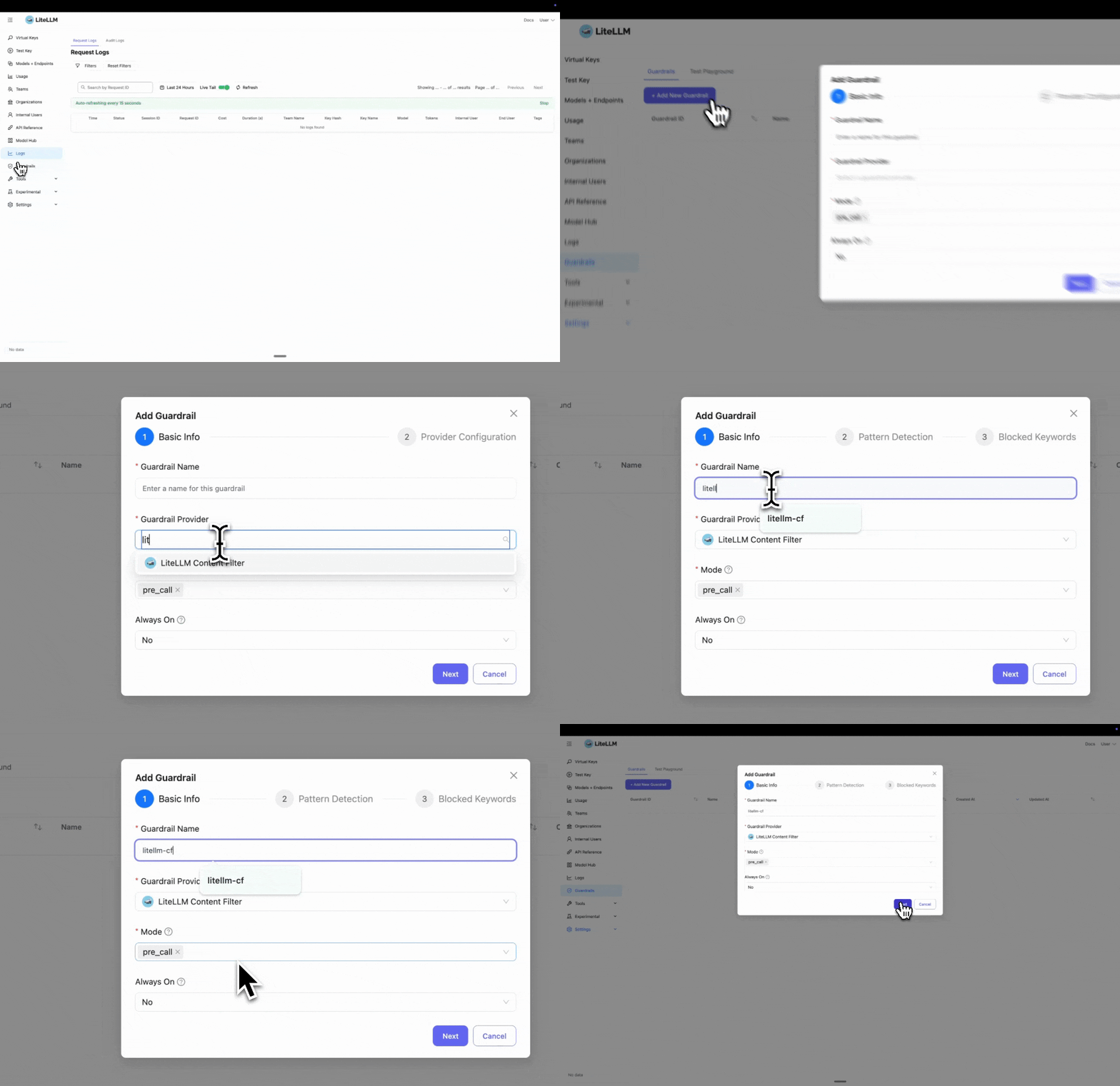
Step 1: Select LiteLLM Content Filter
Click "Add New Guardrail" and select "LiteLLM Content Filter" as your guardrail provider.
Step 2: Configure Pattern Detection
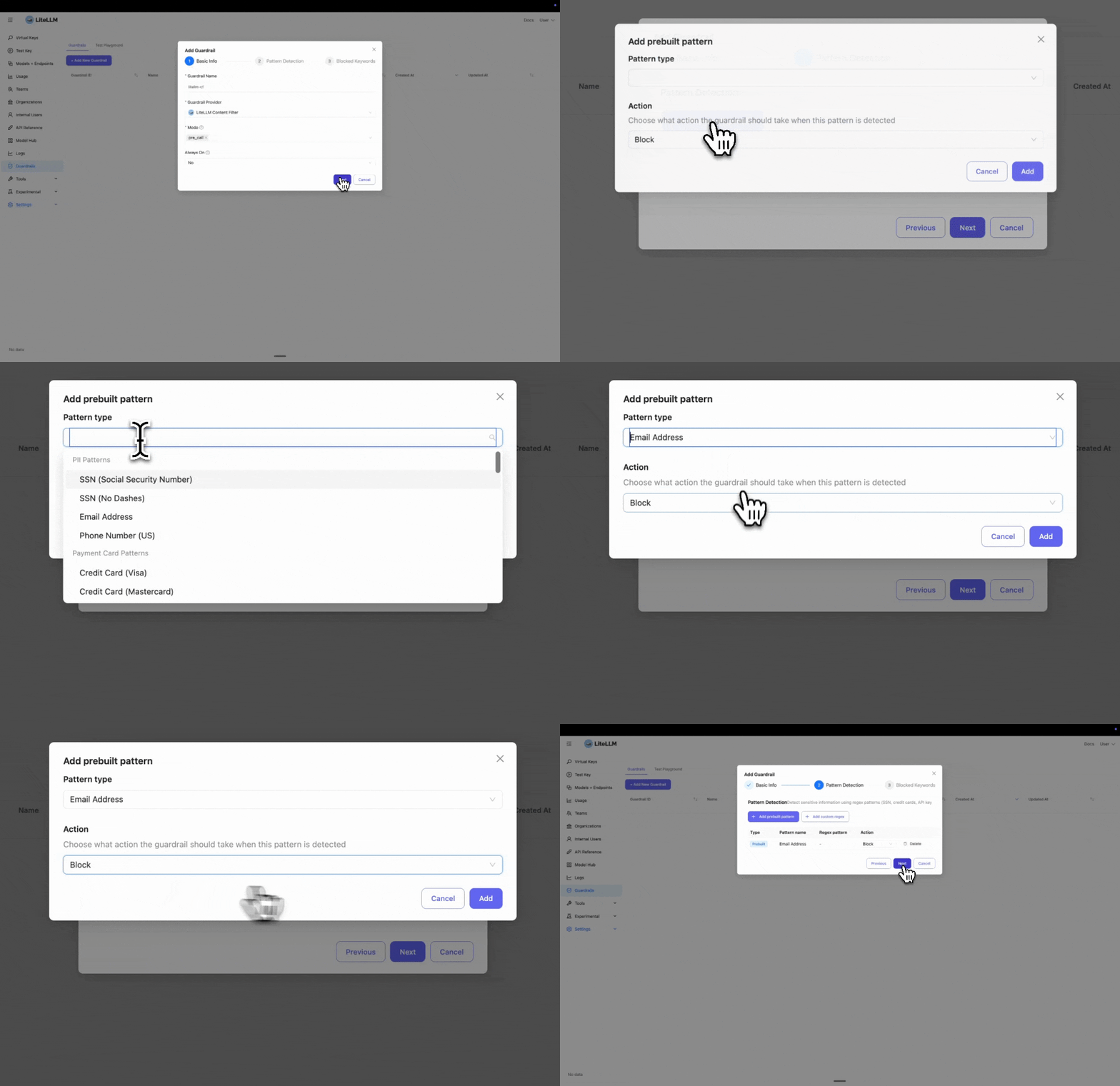
Select the prebuilt entities you want to block or mask. In this example, we select "Email" to detect and block email addresses.
If you need to block a custom entity, you can add a custom regex pattern by clicking "Add custom regex".
Step 3: Add Blocked Keywords
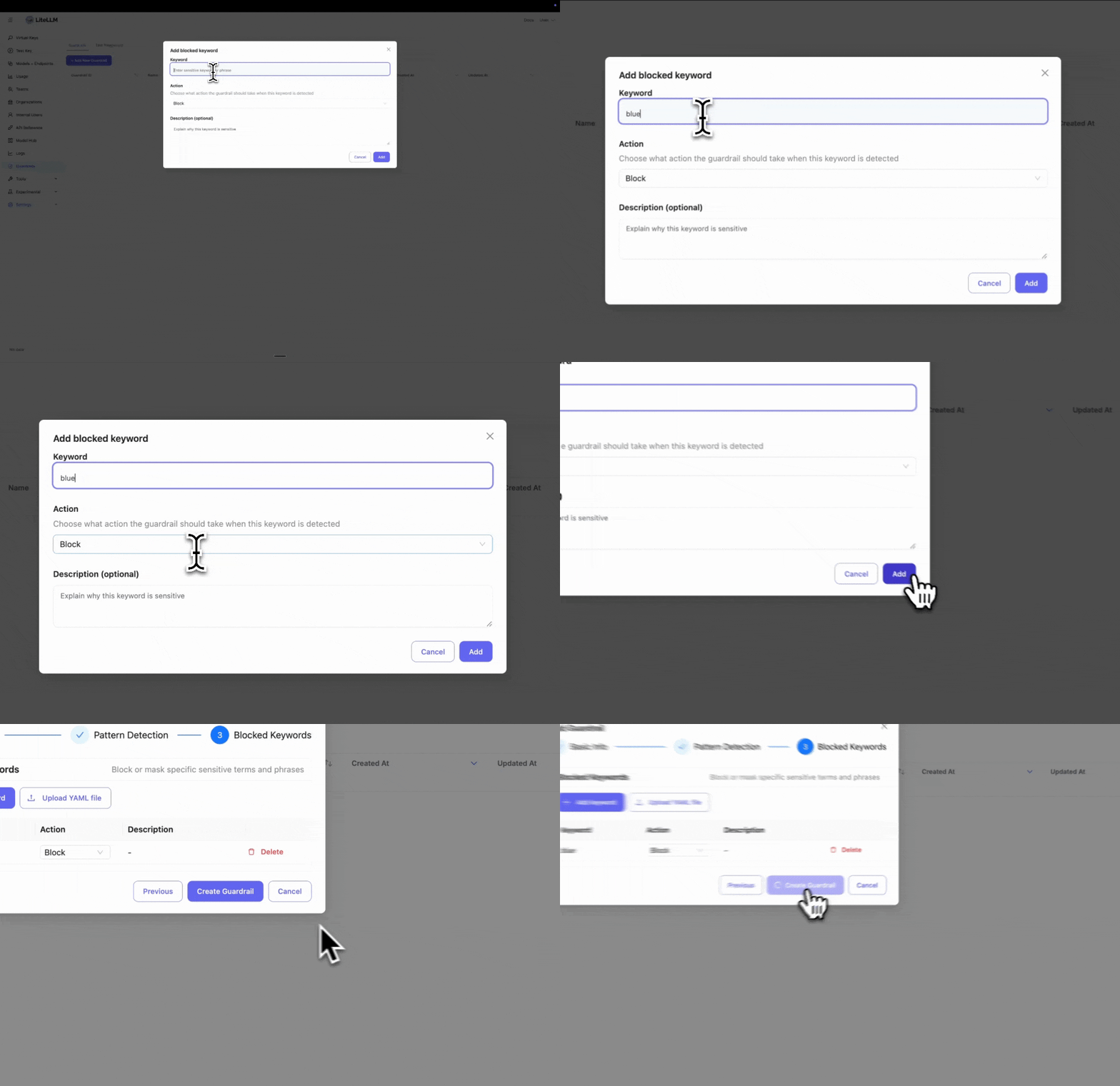
Enter specific keywords you want to block. This is useful if you have policies to block certain words or phrases.
Step 4: Test Your Guardrail
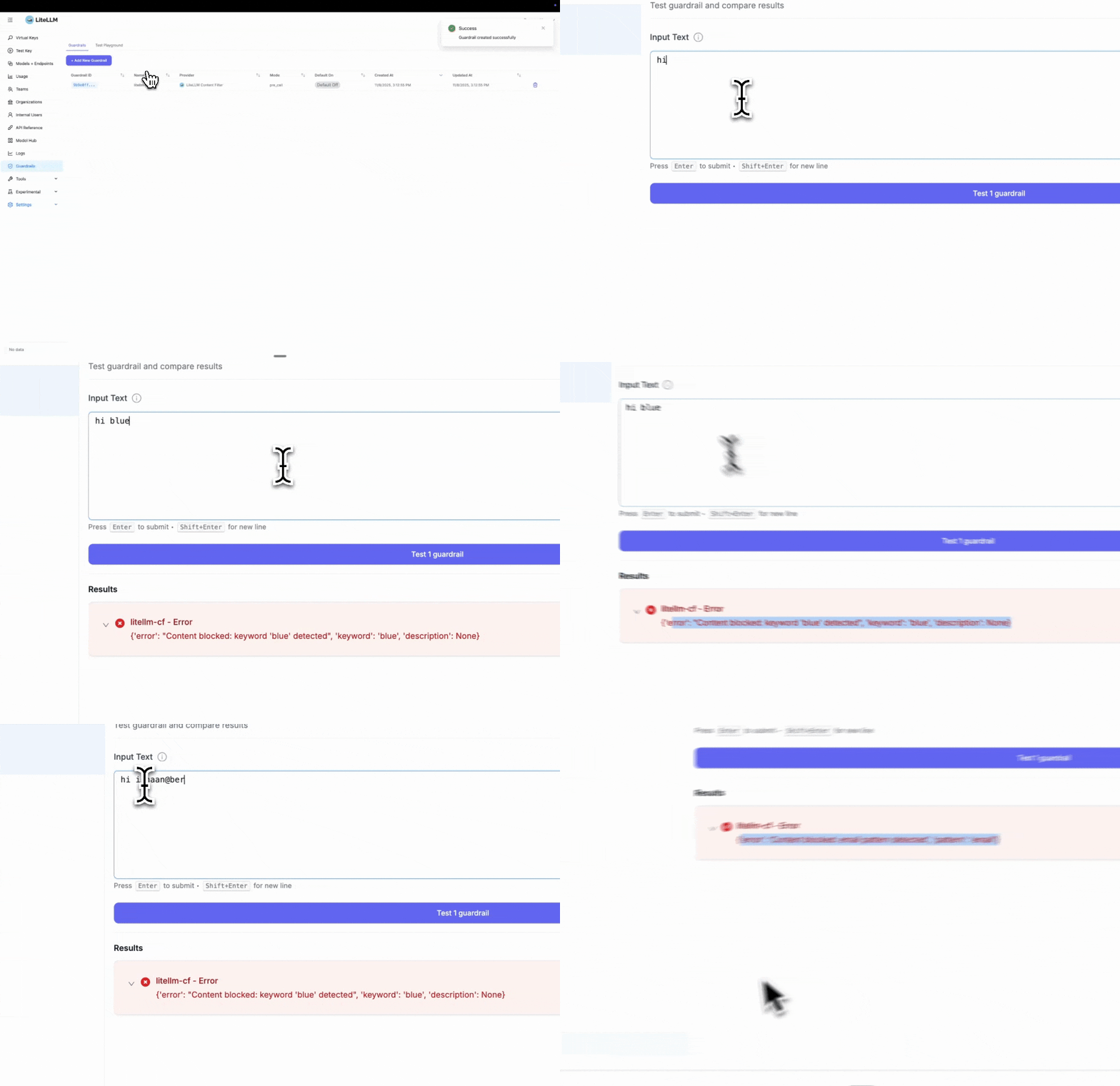
After creating the guardrail, navigate to "Test Playground" to test it. Select the guardrail you just created.
Test examples:
- Blocked keyword test: Entering "hi blue" will trigger the block since we set "blue" as a blocked keyword
- Pattern detection test: Entering "Hi ishaan@berri.ai" will trigger the email pattern detector
LiteLLM Config.yaml Setup
Step 1: Define Guardrails in config.yaml
- Harmful Content Detection
- PII Protection
- Combined
model_list:
  - model_name: gpt-3.5-turbo
    litellm_params:
      model: openai/gpt-3.5-turbo
      api_key: os.environ/OPENAI_API_KEY

guardrails:
  - guardrail_name: "harmful-content-filter"
    litellm_params:
      guardrail: litellm_content_filter
      mode: "pre_call"

      # Enable harmful content categories
      categories:
        - category: "harmful_self_harm"
          enabled: true
          action: "BLOCK"
          severity_threshold: "medium"

        - category: "harmful_violence"
          enabled: true
          action: "BLOCK"
          severity_threshold: "medium"

        - category: "harmful_illegal_weapons"
          enabled: true
          action: "BLOCK"
          severity_threshold: "medium"
model_list:
  - model_name: gpt-3.5-turbo
    litellm_params:
      model: openai/gpt-3.5-turbo
      api_key: os.environ/OPENAI_API_KEY

guardrails:
  - guardrail_name: "content-filter-pre"
    litellm_params:
      guardrail: litellm_content_filter
      mode: "pre_call"

      # Prebuilt patterns for common PII
      patterns:
        - pattern_type: "prebuilt"
          pattern_name: "us_ssn"
          action: "BLOCK"

        - pattern_type: "prebuilt"
          pattern_name: "email"
          action: "MASK"

      # Custom blocked keywords
      blocked_words:
        - keyword: "confidential"
          action: "BLOCK"
          description: "Sensitive internal information"
model_list:
  - model_name: gpt-3.5-turbo
    litellm_params:
      model: openai/gpt-3.5-turbo
      api_key: os.environ/OPENAI_API_KEY

guardrails:
  - guardrail_name: "comprehensive-filter"
    litellm_params:
      guardrail: litellm_content_filter
      mode: "pre_call"

      # Harmful content categories
      categories:
        - category: "harmful_violence"
          enabled: true
          action: "BLOCK"
          severity_threshold: "high"

      # PII patterns
      patterns:
        - pattern_type: "prebuilt"
          pattern_name: "us_ssn"
          action: "BLOCK"
        - pattern_type: "prebuilt"
          pattern_name: "email"
          action: "MASK"

      # Custom keywords
      blocked_words:
        - keyword: "confidential"
          action: "BLOCK"
Step 2: Start LiteLLM Gateway
litellm --config config.yaml
Step 3: Test Request
- SSN Blocked
- Email Masked
curl -i http://localhost:4000/v1/chat/completions \
  -H "Content-Type: application/json" \
  -H "Authorization: Bearer sk-1234" \
  -d '{
    "model": "gpt-3.5-turbo",
    "messages": [
      {"role": "user", "content": "My SSN is 123-45-6789"}
    ],
    "guardrails": ["content-filter-pre"]
  }'
Response: HTTP 400 Error
{
  "error": {
    "message": {
      "error": "Content blocked: us_ssn pattern detected",
      "pattern": "us_ssn"
    },
    "code": "400"
  }
}
curl -i http://localhost:4000/v1/chat/completions \
  -H "Content-Type: application/json" \
  -H "Authorization: Bearer sk-1234" \
  -d '{
    "model": "gpt-3.5-turbo",
    "messages": [
      {"role": "user", "content": "Contact me at john@example.com"}
    ],
    "guardrails": ["content-filter-pre"]
  }'
The request is sent to the LLM with the email masked:
Contact me at [EMAIL_REDACTED]
Configuration
Supported Modes
pre_call- Run before LLM call, filters input messagespost_call- Run after LLM call, filters output responsesduring_call- Run during streaming, filters each chunk in real-time
Actions
BLOCK- Reject the request with HTTP 400 errorMASK- Replace sensitive content with redaction tags (e.g.,[EMAIL_REDACTED])
Prebuilt Patterns
Available Patterns
| Pattern Name | Description | Example |
|---|---|---|
us_ssn | US Social Security Numbers | 123-45-6789 |
email | Email addresses | user@example.com |
phone | Phone numbers | +1-555-123-4567 |
visa | Visa credit cards | 4532-1234-5678-9010 |
mastercard | Mastercard credit cards | 5425-2334-3010-9903 |
amex | American Express cards | 3782-822463-10005 |
aws_access_key | AWS access keys | AKIAIOSFODNN7EXAMPLE |
aws_secret_key | AWS secret keys | wJalrXUtnFEMI/K7MDENG/bPxRfi... |
github_token | GitHub tokens | ghp_16C7e42F292c6912E7710c838347Ae178B4a |
Using Prebuilt Patterns
guardrails:
  - guardrail_name: "pii-filter"
    litellm_params:
      guardrail: litellm_content_filter
      mode: "pre_call"
      patterns:
        - pattern_type: "prebuilt"
          pattern_name: "us_ssn"
          action: "BLOCK"

        - pattern_type: "prebuilt"
          pattern_name: "email"
          action: "MASK"

        - pattern_type: "prebuilt"
          pattern_name: "aws_access_key"
          action: "BLOCK"
Custom Regex Patterns
Define your own regex patterns for domain-specific sensitive data:
guardrails:
  - guardrail_name: "custom-patterns"
    litellm_params:
      guardrail: litellm_content_filter
      mode: "pre_call"
      patterns:
        # Custom employee ID format
        - pattern_type: "regex"
          pattern: '\b[A-Z]{3}-\d{4}\b'
          name: "employee_id"
          action: "MASK"

        # Custom project code format
        - pattern_type: "regex"
          pattern: 'PROJECT-\d{6}'
          name: "project_code"
          action: "BLOCK"
Keyword Filtering
Block or mask specific keywords:
guardrails:
  - guardrail_name: "keyword-filter"
    litellm_params:
      guardrail: litellm_content_filter
      mode: "pre_call"
      blocked_words:
        - keyword: "confidential"
          action: "BLOCK"
          description: "Internal confidential information"

        - keyword: "proprietary"
          action: "MASK"
          description: "Proprietary company data"

        - keyword: "secret_project"
          action: "BLOCK"
Loading Keywords from File
For large keyword lists, use a YAML file:
guardrails:
  - guardrail_name: "keyword-file-filter"
    litellm_params:
      guardrail: litellm_content_filter
      mode: "pre_call"
      blocked_words_file: "/path/to/sensitive_keywords.yaml"
blocked_words:
  - keyword: "project_apollo"
    action: "BLOCK"
    description: "Confidential project codename"

  - keyword: "internal_api"
    action: "MASK"
    description: "Internal API references"

  - keyword: "customer_database"
    action: "BLOCK"
    description: "Protected database name"
Streaming Support
Content filter works with streaming responses by checking each chunk:
guardrails:
  - guardrail_name: "streaming-filter"
    litellm_params:
      guardrail: litellm_content_filter
      mode: "during_call"  # Check each streaming chunk
      patterns:
        - pattern_type: "prebuilt"
          pattern_name: "email"
          action: "MASK"
import openai

client = openai.OpenAI(
    api_key="sk-1234",
    base_url="http://localhost:4000"
)

response = client.chat.completions.create(
    model="gpt-3.5-turbo",
    messages=[{"role": "user", "content": "Tell me about yourself"}],
    stream=True,
    extra_body={"guardrails": ["streaming-filter"]}
)

for chunk in response:
    print(chunk.choices[0].delta.content)
    # Emails automatically masked in real-time
Customizing Redaction Tags
When using the MASK action, sensitive content is replaced with redaction tags. You can customize how these tags appear.
Default Behavior
Patterns: Each pattern type gets its own tag based on the pattern name
Input:  "My email is john@example.com and SSN is 123-45-6789"
Output: "My email is [EMAIL_REDACTED] and SSN is [US_SSN_REDACTED]"
Keywords: All keywords use the same generic tag
Input:  "This is confidential and proprietary information"
Output: "This is [KEYWORD_REDACTED] and [KEYWORD_REDACTED] information"
Customizing Tags
Use pattern_redaction_format and keyword_redaction_tag to change the redaction format:
guardrails:
  - guardrail_name: "custom-redaction"
    litellm_params:
      guardrail: litellm_content_filter
      mode: "pre_call"
      pattern_redaction_format: "***{pattern_name}***"  # Use {pattern_name} placeholder
      keyword_redaction_tag: "***REDACTED***"
      patterns:
        - pattern_type: "prebuilt"
          pattern_name: "email"
          action: "MASK"
        - pattern_type: "prebuilt"
          pattern_name: "us_ssn"
          action: "MASK"
      blocked_words:
        - keyword: "confidential"
          action: "MASK"
Output:
Input:  "Email john@example.com, SSN 123-45-6789, confidential data"
Output: "Email ***EMAIL***, SSN ***US_SSN***, ***REDACTED*** data"
Key Points:
pattern_redaction_formatmust include{pattern_name}placeholder- Pattern names are automatically uppercased (e.g.,
email→EMAIL) keyword_redaction_tagis a fixed string (no placeholders)
Content Categories
LiteLLM Content Filter includes prebuilt content categories for detecting harmful and illegal content. These categories use a combination of keyword matching and multi-word phrase detection.
Available Categories
Harmful Content Categories
| Category | Description | Detection Methods |
|---|---|---|
harmful_self_harm | Self-harm, suicide, eating disorders | Keywords + phrases (exact, fuzzy, proximity) |
harmful_violence | Violence, criminal planning, attacks | Keywords + phrases (exact, fuzzy, proximity) |
harmful_illegal_weapons | Illegal weapons, explosives, dangerous materials | Keywords + phrases (exact, fuzzy, proximity) |
Bias Detection Categories
| Category | Description | Detection Methods |
|---|---|---|
bias_gender | Gender-based discrimination, stereotypes | Keywords + phrases (exact, fuzzy, proximity) |
bias_sexual_orientation | LGBTQ+ discrimination, homophobia, transphobia | Keywords + phrases (exact, fuzzy, proximity) |
bias_racial | Racial/ethnic discrimination, stereotypes | Keywords + phrases (exact, fuzzy, proximity) |
bias_religious | Religious discrimination, stereotypes | Keywords + phrases (exact, fuzzy, proximity) |
Bias detection is complex and context-dependent. Rule-based systems (like this one) can catch explicit discriminatory language but may:
- Generate false positives on legitimate discussions about diversity, identity, and social issues
- Miss subtle, context-dependent biased content
- Vary in effectiveness across languages and cultures
Recommendations:
- Start with high severity thresholds to minimize false positives
- Test thoroughly with your specific use cases
- Monitor and adjust based on real-world performance
- Customize with domain-specific exceptions for your context
- Consider combining with AI-based guardrails for more nuanced detection
For mission-critical bias detection, consider using AI-based guardrails (e.g., HiddenLayer, Lakera) in addition to these rule-based filters.
Using Categories
- Harmful Content
- Bias Detection
- Combined
guardrails:
  - guardrail_name: "harmful-content-filter"
    litellm_params:
      guardrail: litellm_content_filter
      mode: "pre_call"

      # Enable harmful content categories
      categories:
        - category: "harmful_self_harm"
          enabled: true
          action: "BLOCK"
          severity_threshold: "medium"  # Block medium and high severity

        - category: "harmful_violence"
          enabled: true
          action: "BLOCK"
          severity_threshold: "high"  # Only block high severity

        - category: "harmful_illegal_weapons"
          enabled: true
          action: "BLOCK"
          severity_threshold: "medium"
guardrails:
  - guardrail_name: "bias-detection-filter"
    litellm_params:
      guardrail: litellm_content_filter
      mode: "pre_call"

      # Enable bias detection categories
      categories:
        - category: "bias_gender"
          enabled: true
          action: "BLOCK"
          severity_threshold: "medium"

        - category: "bias_sexual_orientation"
          enabled: true
          action: "BLOCK"
          severity_threshold: "medium"

        - category: "bias_racial"
          enabled: true
          action: "BLOCK"
          severity_threshold: "high"  # Only block explicit racism

        - category: "bias_religious"
          enabled: true
          action: "BLOCK"
          severity_threshold: "medium"
guardrails:
  - guardrail_name: "comprehensive-content-filter"
    litellm_params:
      guardrail: litellm_content_filter
      mode: "pre_call"

      # Harmful content
      categories:
        - category: "harmful_self_harm"
          enabled: true
          action: "BLOCK"
          severity_threshold: "medium"

        - category: "harmful_violence"
          enabled: true
          action: "BLOCK"
          severity_threshold: "medium"

        # Bias detection
        - category: "bias_gender"
          enabled: true
          action: "BLOCK"
          severity_threshold: "high"

        - category: "bias_sexual_orientation"
          enabled: true
          action: "BLOCK"
          severity_threshold: "high"

        - category: "bias_racial"
          enabled: true
          action: "BLOCK"
          severity_threshold: "high"
Severity Levels
Categories support three severity levels:
high- Explicit harmful intent (e.g., "how to kill someone", "make a bomb")medium- Context-dependent terms (e.g., "murder", "bomb")low- Borderline terms that may have legitimate uses
Severity Thresholds:
severity_threshold: "high"- Only blocks high severity itemsseverity_threshold: "medium"- Blocks medium and high severity items (default)severity_threshold: "low"- Blocks all severity levels
Example: Configuring Different Thresholds per Category
guardrails:
  - guardrail_name: "balanced-harmful-filter"
    litellm_params:
      guardrail: litellm_content_filter
      mode: "pre_call"

      categories:
        # Strict filtering for self-harm (block medium+)
        - category: "harmful_self_harm"
          enabled: true
          action: "BLOCK"
          severity_threshold: "medium"

        # Very strict for weapons (block all levels)
        - category: "harmful_illegal_weapons"
          enabled: true
          action: "BLOCK"
          severity_threshold: "low"

        # Moderate for violence (only block explicit)
        - category: "harmful_violence"
          enabled: true
          action: "BLOCK"
          severity_threshold: "high"
This configuration:
- Blocks medium+ severity self-harm content (catches both explicit and concerning language)
- Blocks all weapons-related content (strictest - includes even borderline terms)
- Only blocks high-severity violence content (most lenient - only explicit harmful intent)
Test Examples
- Harmful Content
- Bias Detection
curl -i http://localhost:4000/v1/chat/completions \
  -H "Content-Type: application/json" \
  -H "Authorization: Bearer sk-1234" \
  -d '{
    "model": "gpt-3.5-turbo",
    "messages": [
      {"role": "user", "content": "How to make a pipe bomb at home"}
    ],
    "guardrails": ["harmful-content-filter"]
  }'
Response: HTTP 400 Error
{
  "error": {
    "message": {
      "error": "Content blocked: harmful_illegal_weapons category phrase 'make a bomb' detected (severity: high)",
      "category": "harmful_illegal_weapons",
      "phrase": "make a bomb",
      "severity": "high"
    },
    "code": "400"
  }
}
curl -i http://localhost:4000/v1/chat/completions \
  -H "Content-Type: application/json" \
  -H "Authorization: Bearer sk-1234" \
  -d '{
    "model": "gpt-3.5-turbo",
    "messages": [
      {"role": "user", "content": "Women are too emotional to be leaders"}
    ],
    "guardrails": ["bias-detection-filter"]
  }'
Response: HTTP 400 Error
{
  "error": {
    "message": {
      "error": "Content blocked: bias_gender category phrase 'women are too emotional to lead' detected (severity: high)",
      "category": "bias_gender",
      "phrase": "women are too emotional to lead",
      "severity": "high"
    },
    "code": "400"
  }
}
Custom Category Files
You can override the default categories with your own keyword/phrase lists:
guardrails:
  - guardrail_name: "custom-harmful-filter"
    litellm_params:
      guardrail: litellm_content_filter
      mode: "pre_call"

      categories:
        - category: "harmful_self_harm"
          enabled: true
          action: "BLOCK"
          severity_threshold: "medium"
          category_file: "/path/to/my_custom_self_harm.yaml"  # Use custom file
Custom Category File Format:
category_name: "harmful_self_harm"
description: "Custom self-harm detection"
default_action: "BLOCK"

# Keywords with severity
keywords:
  - keyword: "harm myself"
    severity: "high"
  - keyword: "suicide"
    severity: "medium"

# Multi-word phrases
phrases:
  # Exact match
  - phrase: "how to commit suicide"
    severity: "high"
    match_type: "exact"

  # Fuzzy match (catches "planning suicide", "planned suicide")
  - phrase: "plan suicide"
    severity: "high"
    match_type: "fuzzy"

  # Proximity match (words within distance)
  - phrase: "end life"
    severity: "high"
    match_type: "proximity"
    max_distance: 3

# Legitimate uses to ignore (e.g., prevention resources)
exceptions:
  - "suicide prevention"
  - "suicide hotline"
  - "mental health"
Phrase Detection Types
Categories support three types of phrase detection:
-
Exact Match - Exact substring matching
- phrase: "how to kill someone"
match_type: "exact" -
Fuzzy Match - Handles word variations (stemming)
- phrase: "plan attack"
  match_type: "fuzzy"
# Matches: "planning attack", "planned attacks", "plan an attack" -
Proximity Match - Words appearing within distance
- phrase: "gun school"
  match_type: "proximity"
  max_distance: 5
# Matches: "brought a gun to school", "gun found at the school"
Combining Categories with Other Patterns
You can use categories alongside traditional patterns and keywords:
guardrails:
  - guardrail_name: "comprehensive-filter"
    litellm_params:
      guardrail: litellm_content_filter
      mode: "pre_call"

      # Harmful content categories
      categories:
        - category: "harmful_violence"
          enabled: true
          action: "BLOCK"
          severity_threshold: "medium"

      # Traditional PII patterns
      patterns:
        - pattern_type: "prebuilt"
          pattern_name: "us_ssn"
          action: "BLOCK"
        - pattern_type: "prebuilt"
          pattern_name: "email"
          action: "MASK"

      # Custom blocked keywords
      blocked_words:
        - keyword: "confidential"
          action: "BLOCK"
Use Cases
1. Harmful Content Detection
Block or detect requests containing harmful, illegal, or dangerous content:
categories:
  - category: "harmful_self_harm"
    enabled: true
    action: "BLOCK"
    severity_threshold: "medium"
  - category: "harmful_violence"
    enabled: true
    action: "BLOCK"
    severity_threshold: "high"
  - category: "harmful_illegal_weapons"
    enabled: true
    action: "BLOCK"
    severity_threshold: "medium"
Benefits:
- Prevents misuse of LLMs for harmful purposes
- Protects users from dangerous content
- No external API calls - runs locally and fast
- Configurable severity thresholds to balance false positives
2. Bias and Discrimination Detection
Detect and block biased, discriminatory, or hateful content across multiple dimensions:
categories:
  # Gender-based discrimination
  - category: "bias_gender"
    enabled: true
    action: "BLOCK"
    severity_threshold: "medium"

  # LGBTQ+ discrimination
  - category: "bias_sexual_orientation"
    enabled: true
    action: "BLOCK"
    severity_threshold: "medium"

  # Racial/ethnic discrimination
  - category: "bias_racial"
    enabled: true
    action: "BLOCK"
    severity_threshold: "high"  # Only explicit to reduce false positives

  # Religious discrimination
  - category: "bias_religious"
    enabled: true
    action: "BLOCK"
    severity_threshold: "medium"
What It Detects:
- Gender Bias: Stereotypes (e.g., "women belong in the kitchen"), discriminatory language, gender-based generalizations
- Sexual Orientation Bias: Homophobia, transphobia, discriminatory statements about LGBTQ+ individuals
- Racial Bias: Racial stereotypes, discriminatory generalizations, racial supremacy language
- Religious Bias: Religious discrimination, stereotypes, hate speech targeting religious groups
Benefits:
- Creates safer, more inclusive AI interactions
- Helps meet diversity and inclusion requirements
- Detects both explicit slurs and subtle stereotyping patterns
- Includes exceptions for legitimate educational and anti-discrimination discussions
Sensitivity Tuning:
For bias detection, severity thresholds are critical to balance safety and legitimate discourse:
# Conservative (low false positives, may miss subtle bias)
categories:
  - category: "bias_racial"
    severity_threshold: "high"  # Only blocks explicit discriminatory language

# Balanced (recommended)
categories:
  - category: "bias_gender"
    severity_threshold: "medium"  # Blocks stereotypes and explicit discrimination

# Strict (high safety, may have more false positives)
categories:
  - category: "bias_sexual_orientation"
    severity_threshold: "low"  # Blocks all potentially problematic content
Exceptions for Legitimate Use:
Bias categories include exceptions for legitimate discussions:
- Research and education (e.g., "study shows gender gap in STEM")
- Anti-discrimination advocacy (e.g., "combat racism", "fight homophobia")
- Diversity and inclusion initiatives
- Historical context and documentation
You can add custom exceptions:
# custom_bias_gender.yaml
exceptions:
  - "gender diversity program"
  - "addressing gender bias"
  - "research study"
  - "workplace equality"
3. PII Protection
Block or mask personally identifiable information before sending to LLMs:
patterns:
  - pattern_type: "prebuilt"
    pattern_name: "us_ssn"
    action: "BLOCK"
  - pattern_type: "prebuilt"
    pattern_name: "email"
    action: "MASK"
2. Credential Detection
Prevent API keys and secrets from being exposed:
patterns:
  - pattern_type: "prebuilt"
    pattern_name: "aws_access_key"
    action: "BLOCK"
  - pattern_type: "prebuilt"
    pattern_name: "github_token"
    action: "BLOCK"
3. Sensitive Internal Data Protection
Block or mask references to confidential internal projects, codenames, or proprietary information:
blocked_words:
  - keyword: "project_titan"
    action: "BLOCK"
    description: "Confidential project codename"
  - keyword: "internal_api"
    action: "MASK"
    description: "Internal system references"
For large lists of sensitive terms, use a file:
blocked_words_file: "/path/to/sensitive_terms.yaml"
4. Safe AI for Consumer Applications
Combining harmful content and bias detection for consumer-facing AI:
guardrails:
  - guardrail_name: "safe-consumer-ai"
    litellm_params:
      guardrail: litellm_content_filter
      mode: "pre_call"

      categories:
        # Harmful content - strict
        - category: "harmful_self_harm"
          enabled: true
          action: "BLOCK"
          severity_threshold: "medium"

        - category: "harmful_violence"
          enabled: true
          action: "BLOCK"
          severity_threshold: "medium"

        # Bias detection - balanced
        - category: "bias_gender"
          enabled: true
          action: "BLOCK"
          severity_threshold: "high"  # Avoid blocking legitimate gender discussions

        - category: "bias_sexual_orientation"
          enabled: true
          action: "BLOCK"
          severity_threshold: "medium"

        - category: "bias_racial"
          enabled: true
          action: "BLOCK"
          severity_threshold: "high"  # Education and news may discuss race
Perfect for:
- Chatbots and virtual assistants
- Educational AI tools
- Customer service AI
- Content generation platforms
- Public-facing AI applications
5. Compliance
Ensure regulatory compliance by filtering sensitive data types:
patterns:
  - pattern_type: "prebuilt"
    pattern_name: "visa"
    action: "BLOCK"
  - pattern_type: "prebuilt"
    pattern_name: "us_ssn"
    action: "BLOCK"
Best Practices for Bias Detection
Choosing the Right Severity Threshold
Bias detection requires careful tuning to avoid blocking legitimate content:
High Threshold (Recommended for most use cases)
- Blocks only explicit discriminatory language
- Lower false positives
- Allows nuanced discussions about identity, diversity, and social issues
- Good for: Public-facing applications, education, research
Medium Threshold
- Blocks stereotypes and generalizations
- Balanced approach
- May catch some edge cases in legitimate discourse
- Good for: Consumer applications, internal tools, moderated environments
Low Threshold
- Strictest filtering
- Blocks even borderline language
- Higher false positives but maximum safety
- Good for: Youth-focused applications, highly controlled environments
Testing Your Bias Filters
Always test with realistic use cases:
# Test legitimate discussions (should NOT be blocked)
- "Our company has a gender diversity initiative"
- "Research shows racial disparities in healthcare"
- "We support LGBTQ+ rights and equality"
- "Religious freedom is a fundamental right"

# Test discriminatory content (SHOULD be blocked)
- "Women are too emotional to lead"
- "All [group] are [negative stereotype]"
- "Being gay is unnatural"
- "[Religious group] are all extremists"
Monitoring and Iteration
- Log blocked requests to review false positives
- Add exceptions for legitimate terms in your domain
- Adjust severity thresholds based on your audience
- Use custom category files for domain-specific bias patterns
Cultural and Linguistic Considerations
The prebuilt categories focus on English and common patterns. For other languages or cultural contexts:
- Create custom category files with region-specific terms
- Consult with native speakers and cultural experts
- Include local slurs and stereotypes
- Adjust severity based on regional norms
Troubleshooting
False Positives with Bias Detection
Issue: Legitimate discussions about diversity, identity, or social issues are being blocked
Solutions:
- Raise severity threshold:
categories:
  - category: "bias_racial"
    severity_threshold: "high"  # Only explicit discrimination
- Add domain-specific exceptions:
# my_custom_bias_gender.yaml
exceptions:
  - "gender pay gap"
  - "gender diversity"
  - "women in tech"
  - "gender equality"
  - "dei initiative"
  - "inclusion program"
- Review what was blocked: Check error details to understand what triggered the block:
{
  "error": "Content blocked: bias_gender category phrase 'women in leadership' detected",
  "category": "bias_gender",
  "phrase": "women in leadership",
  "severity": "medium"
}
If this is a false positive, add "women in leadership" to exceptions.
False Positives with Categories
Issue: Legitimate content is being blocked by category filters
Solution 1: Adjust severity threshold to only block high-severity items:
categories:
  - category: "harmful_violence"
    enabled: true
    action: "BLOCK"
    severity_threshold: "high"  # Only block explicit harmful content
Solution 2: Add exceptions to your custom category file:
# my_custom_violence.yaml
exceptions:
  - "crime statistics"
  - "documentary"
  - "news report"
  - "historical context"
Solution 3: Use a custom category file with your own curated keyword list:
categories:
  - category: "harmful_violence"
    enabled: true
    action: "BLOCK"
    category_file: "/path/to/my_violence_keywords.yaml"
Category Not Loading
Issue: Category is not being applied
Checklist:
- Verify category is enabled:
enabled: true - Check category name matches file:
harmful_self_harm.yaml - Check file exists in
litellm/proxy/guardrails/guardrail_hooks/litellm_content_filter/categories/ - Review logs for loading errors:
litellm --config config.yaml --detailed_debug
Phrase Not Matching
Issue: Expected phrase is not being detected
Solution: Try different match types:
# If exact match doesn't work
- phrase: "make bomb"
  match_type: "exact"  # Requires exact "make bomb"

# Try fuzzy to catch variations
- phrase: "make bomb"
  match_type: "fuzzy"  # Catches "making bombs", "made a bomb"

# Try proximity for word order flexibility
- phrase: "make bomb"
  match_type: "proximity"
  max_distance: 5  # Catches "make a pipe bomb at home"
Too Many False Negatives
Issue: Harmful content is not being caught
Solution 1: Lower severity threshold:
severity_threshold: "low" # Catch more but may increase false positives
Solution 2: Add custom phrases for your specific use case:
categories:
  - category: "harmful_violence"
    enabled: true
    category_file: "/path/to/enhanced_violence.yaml"

# In enhanced_violence.yaml, add domain-specific phrases
phrases:
  - phrase: "your specific harmful phrase"
    severity: "high"
    match_type: "exact"
Pattern Not Matching
Issue: Regex pattern isn't detecting expected content
Solution: Test your regex pattern:
import re
pattern = r'\b[A-Z]{3}-\d{4}\b'
test_text = "Employee ID: ABC-1234"
print(re.search(pattern, test_text))  # Should match
Multiple Pattern Matches
Issue: Text contains multiple sensitive patterns
Solution: Guardrail checks categories first, then patterns, then keywords. Order by priority:
# Categories checked first (high priority)
categories:
  - category: "harmful_self_harm"
    severity_threshold: "high"

# Then regex patterns
patterns:
  - pattern_type: "prebuilt"
    pattern_name: "us_ssn"
    action: "BLOCK"

# Then simple keywords
blocked_words:
  - keyword: "confidential"
    action: "MASK"